A discoverability-focused test of usability
Context
Viewing network traffic in the Illumio product is fundamental. There are lots of ways to visualize traffic data, and network maps are the typical tool for new users. Here you see the most widely used map in the product, and the designers had just implemented two new interactions:
- A marquee-selection tool enabled users to select a group of lines to get details about all of them at once. That’s what’s shown above.
- Since the marquee-selection tool interpreted click-and-drag actions as a selection, a pan tool was introduced to let users pan around on the map with a click-and-drag.
The next release was approaching, and the product team wanted to know whether the feature was ready to launch. In deciding on whether to hold the feature back, one PM wanted to know, “Is this going to help people as is, or are they going to get confused?” I was given just under two weeks to put together a rational answer.
TLDR: Users quickly figure out how to bulk select and find it very useful, but confusion prevents smooth adoption of related interactions.
Goals
As usual, the first step was to define specific, testable research questions. For describing discoverability, I focused on measuring time. How long would it take users to successfully use one tool to accomplish a goal? One special consideration: since marquee selection and the pan tool could not be used at the same time, how long would it take to successfully switch between them? There were secondary questions as well. Here’s the full list of research questions.
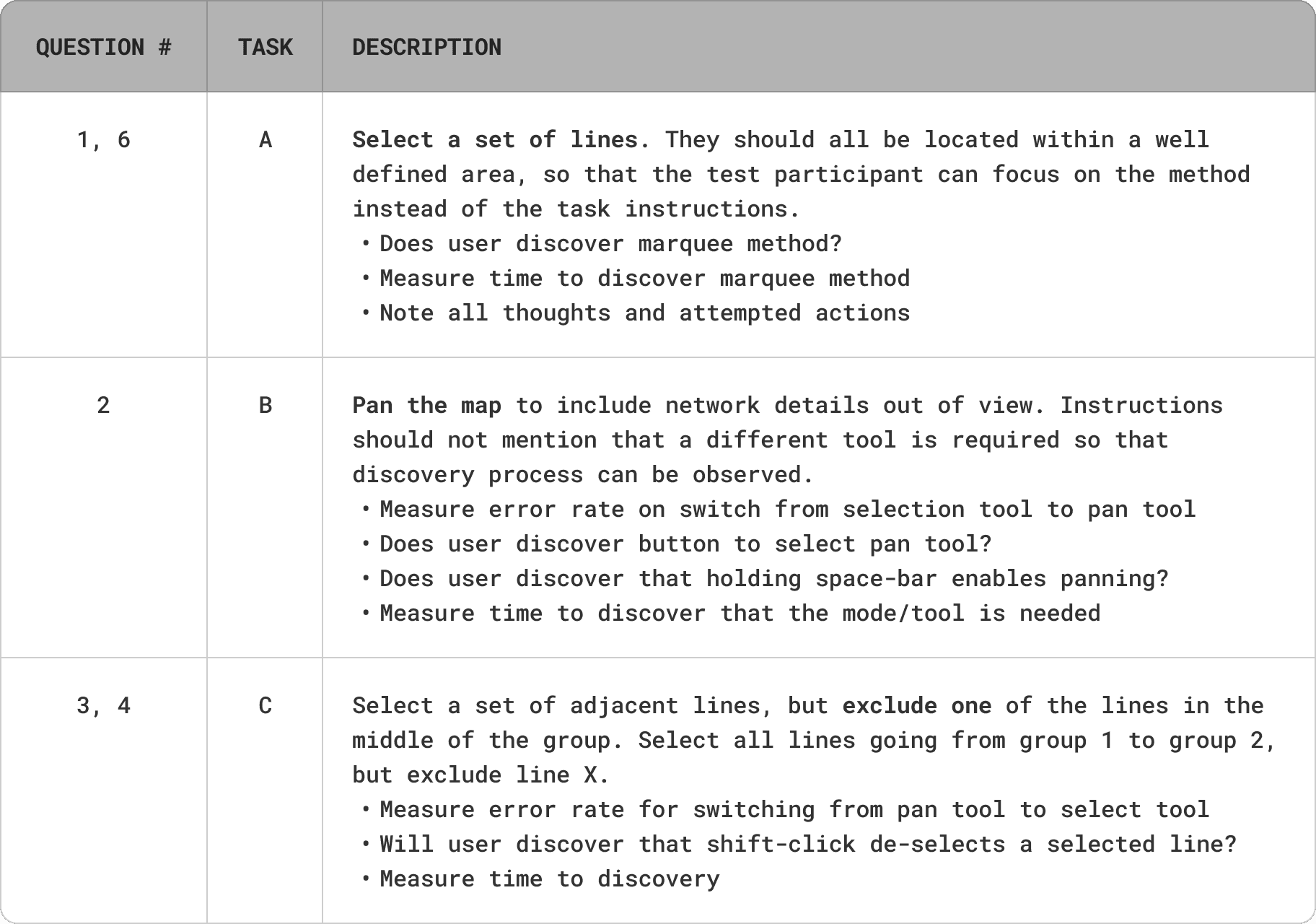
- How long does it take to discover the marquee selection method and complete a representative task?
- How long does it take to discover that a different mode is required to pan the map?
- How long does it take to discover that a single line can be selected by marquee?
- How long does it take to discover that shift-clicking a selected flow will remove it from the selection set?
- How long does it take to remove a line in the middle of a crowd of lines?
- When users have the intention to select a set of adjacent lines, what will they think to try first?
Solutions
The study answered those questions with a timed think-aloud protocol across three tasks (A/B/C), mapped to the six research questions.
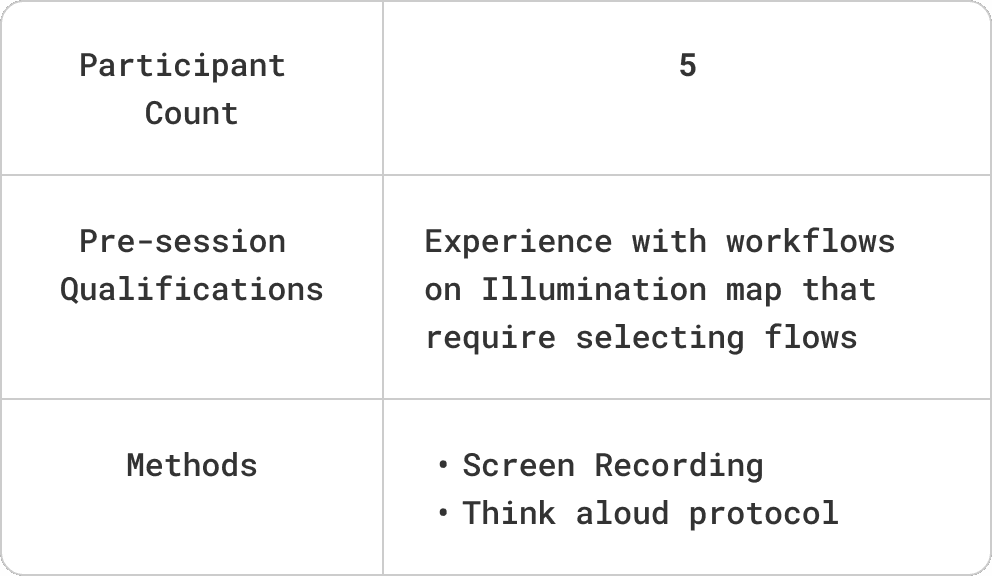
Participant Plan for Round 1
Study script highlights
Here are the steps from the study script
- Greeting, introductions.
- Orient: “This won’t take a lot of your time. First I’m going to give you a few tasks and watch while you work on them. After that I’ll explain what we were trying to learn, ask a couple of follow-up questions, and make sure to answer any questions you have. While you’re working on the tasks, I’m going to record your screen. This will help me capture small details about the tasks in my notes. I’ll protect your anonymity. No one will know it was you doing the task, making a comment, or giving a specific answer to a question.”
- Task A
- Send first link to participant
- Navigate: “I’ve just sent you a link to one of the PCE consoles, and I've included some login credentials. Could you please log in?”
- Start recording: “I’m going to start recording the session now. Will that be okay?”
- Task instructions: “Can you see that one of the app-group bubbles is expanded? You can see lines showing traffic in that app-group as well. The interface now allows you to select more than one line at a time. I’d like you to try to select all of the lines in the app-group, but one reminder before you start. I’d like you to think out loud. Say what you’re trying to do, what annoys you, what you like—anything that’s happening in your mind while you do the task. If you’re having trouble, that shows us that the design didn’t make the job easy. Just say what you’re thinking. Any questions about that? Okay, try to select all the lines.”
- Upon completion: “Nicely done. Thanks for thinking out loud.” (Ask any clarifying questions for that task here)
- Task B
- Task instructions: “Here’s the next task. Do you see the three location bubbles for all, Western, and US? Not all of their app groups or visible on the map. Can you move the map so that they’re all in view? Please think aloud while you do it.”
- Upon completion: “Nicely done.” (Ask any clarifying questions for that task here)
- Task C
- Send second link to participant: https://devtest129.ilabs.io:8443/#/map/location/418/group/416x417x418/
- Navigate: “I’ve just sent you a link another map view. Could you please navigate there?”
- Task instructions: “Here’s the next task. There are a lot of traffic lines next to each other here. Try to select all of them except those provided by dns. Please think aloud while you do it.”
- Upon completion: “Great job. That was the last task.” (Ask any clarifying questions for that task here)
- Debrief: “This was great. Do you have any questions? You can probably tell what you were helping us understand. The new design that will enable users to select multiple lines changes how the UI works on the maps. We’re trying to learn what could be difficult for people trying to use it for the first time. Watching you try these tasks showed us a lot. (talk about some insights and mention a few of the participants suggestions if there were any). If you have thoughts later on, please let me know!"
Process
Round 1 results focused on marquee selection, the pan tool, and select/deselect discoverability.
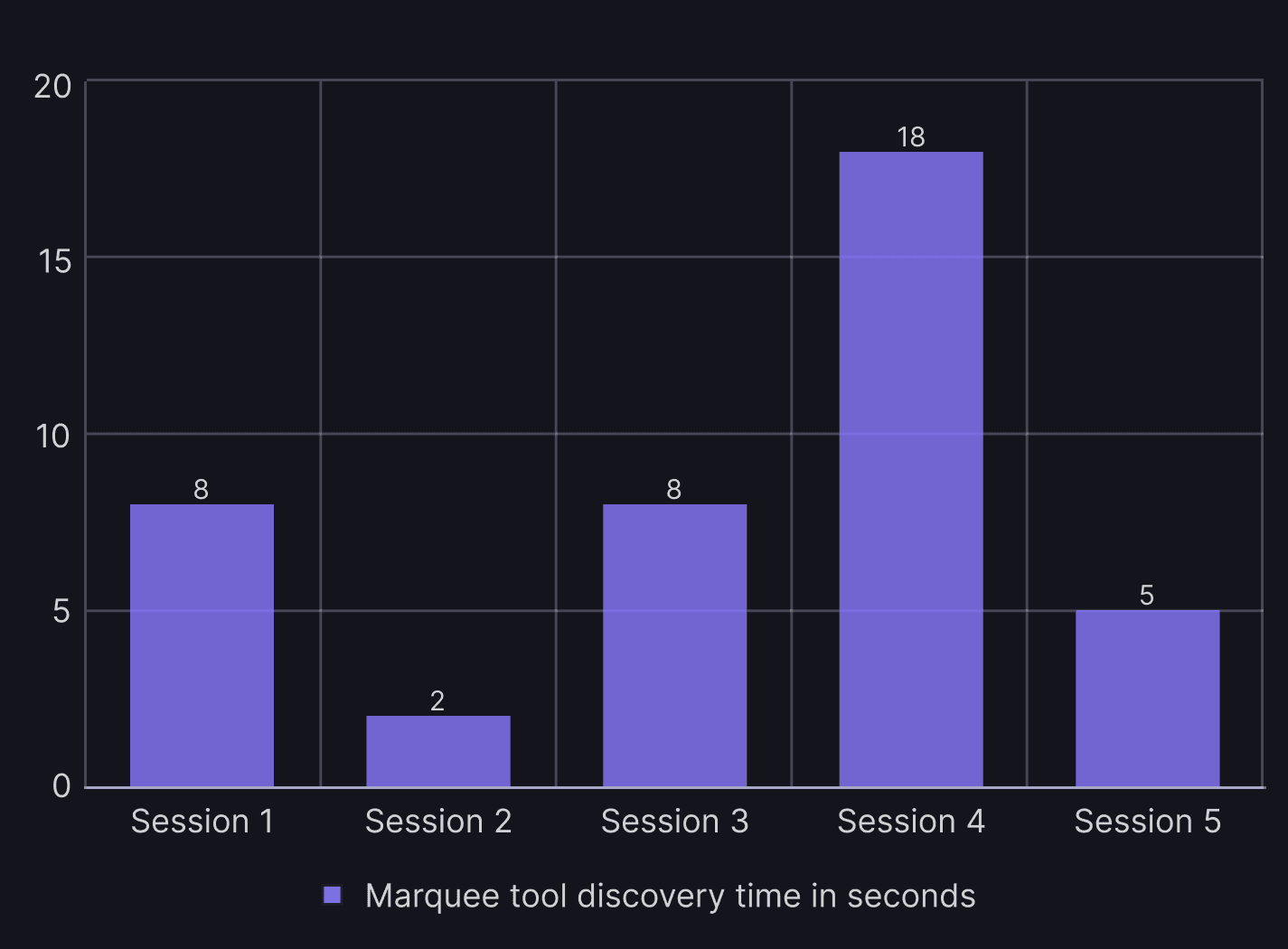
How long does it take to discover the marquee selection method and complete a representative task?
time on task
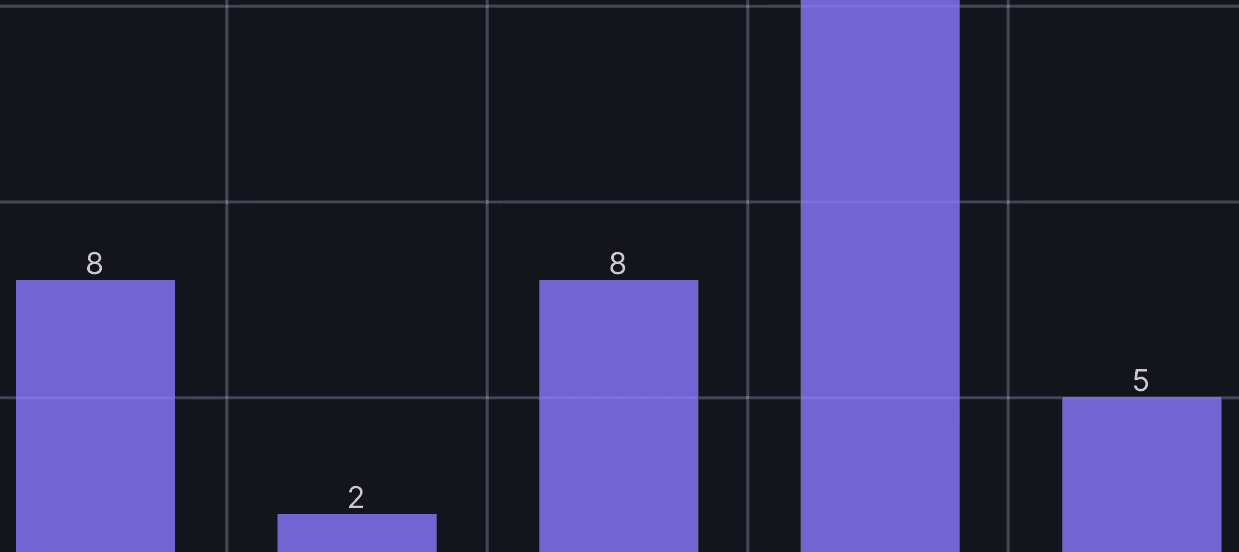
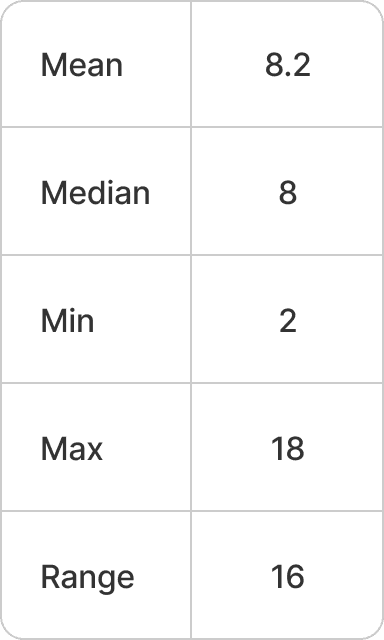
With 4/5 participants completing the task in under 10 seconds, there is support for the expectation that the discoverability for marquee selection is acceptable.
errors
Task error rate: 80%
- Three started by holding down the shift key while clicking individual lines before attempting marquee selection. This is a valid workflow, but laborious. One completed the entire selection this way. Before subsequently experimenting with marquee at 18 seconds, he made this comment: “That’s a lot of work, man.”
- One started by holding down the control key. Because this didn’t work, marquee selection was attempted at 5 sec.
- One made no error and tried marquee selection first
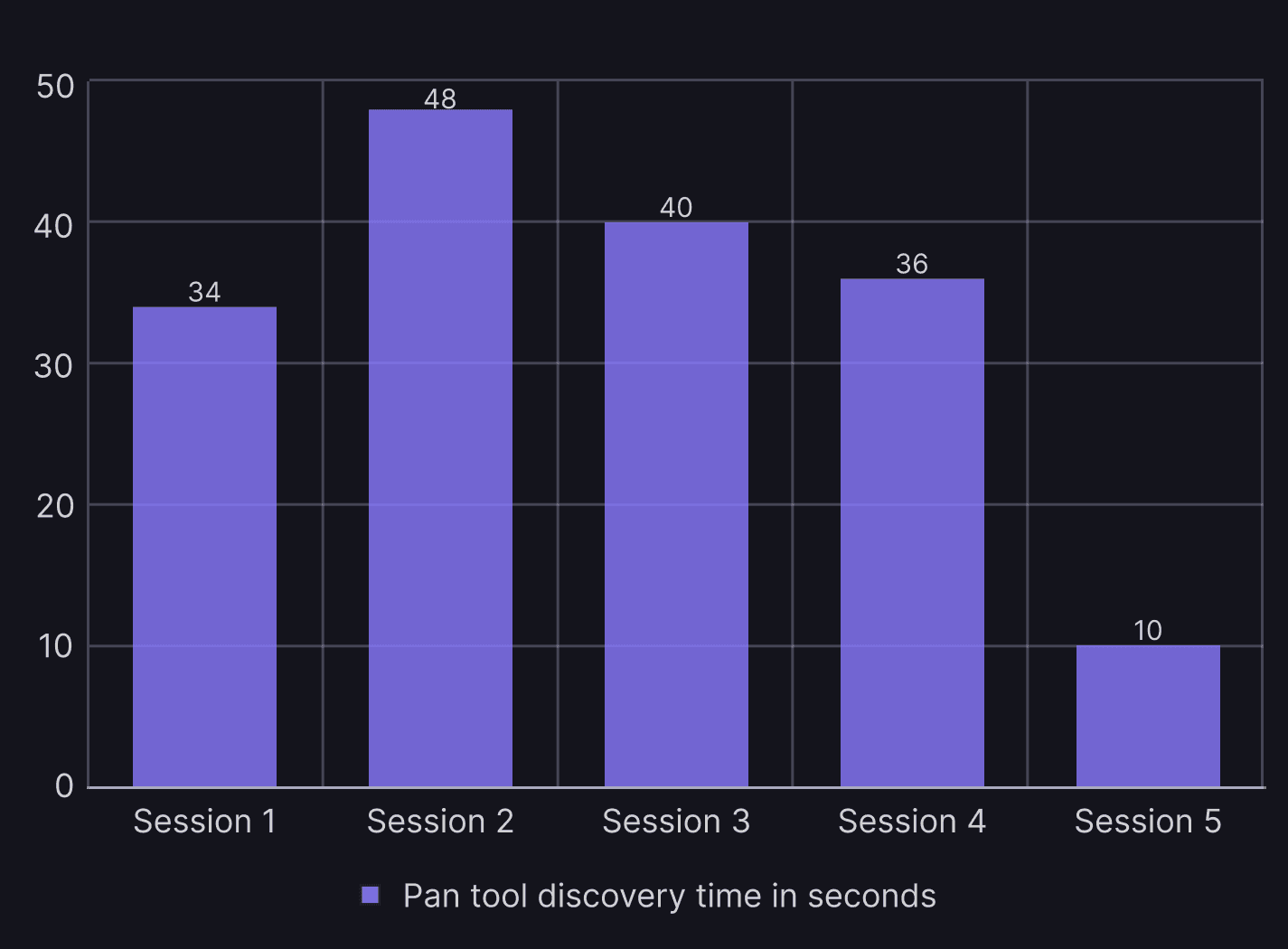
How long does it take to discover that a different mode is required to pan the map?
time on task
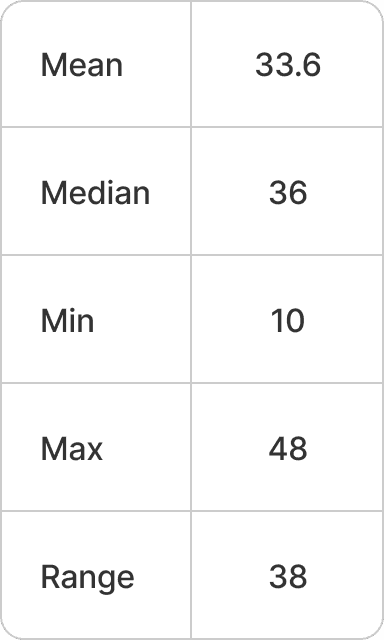
With 1/5 participants completing the task in under 30 seconds, there is no support for the expectation that the discoverability of the pan tool is acceptable.
“I’m kind of lost” -Participant 4
The pan tool was discovered while looking for the zoom tool. Participants did not expect a pan tool and could not name any applications that had a similar tool. No participants discovered that holding the space bar while dragging would pan the map.
“I think the hand (pan tool) should be default, because I’m so used to moving the map.“
errors
Task error rate: 100% (all participants committed at least one error before completing the task)
- Four participants tried dragging while the Marquee selection was active before finding the pan tool
- Three participants tried zooming before finding the pan tool
- One participant tried using the filters, but couldn’t get all locations in view
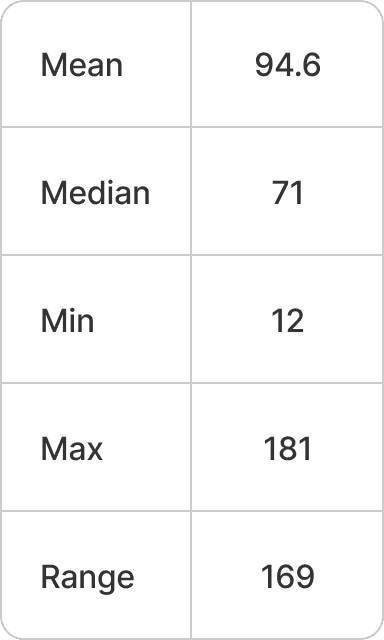
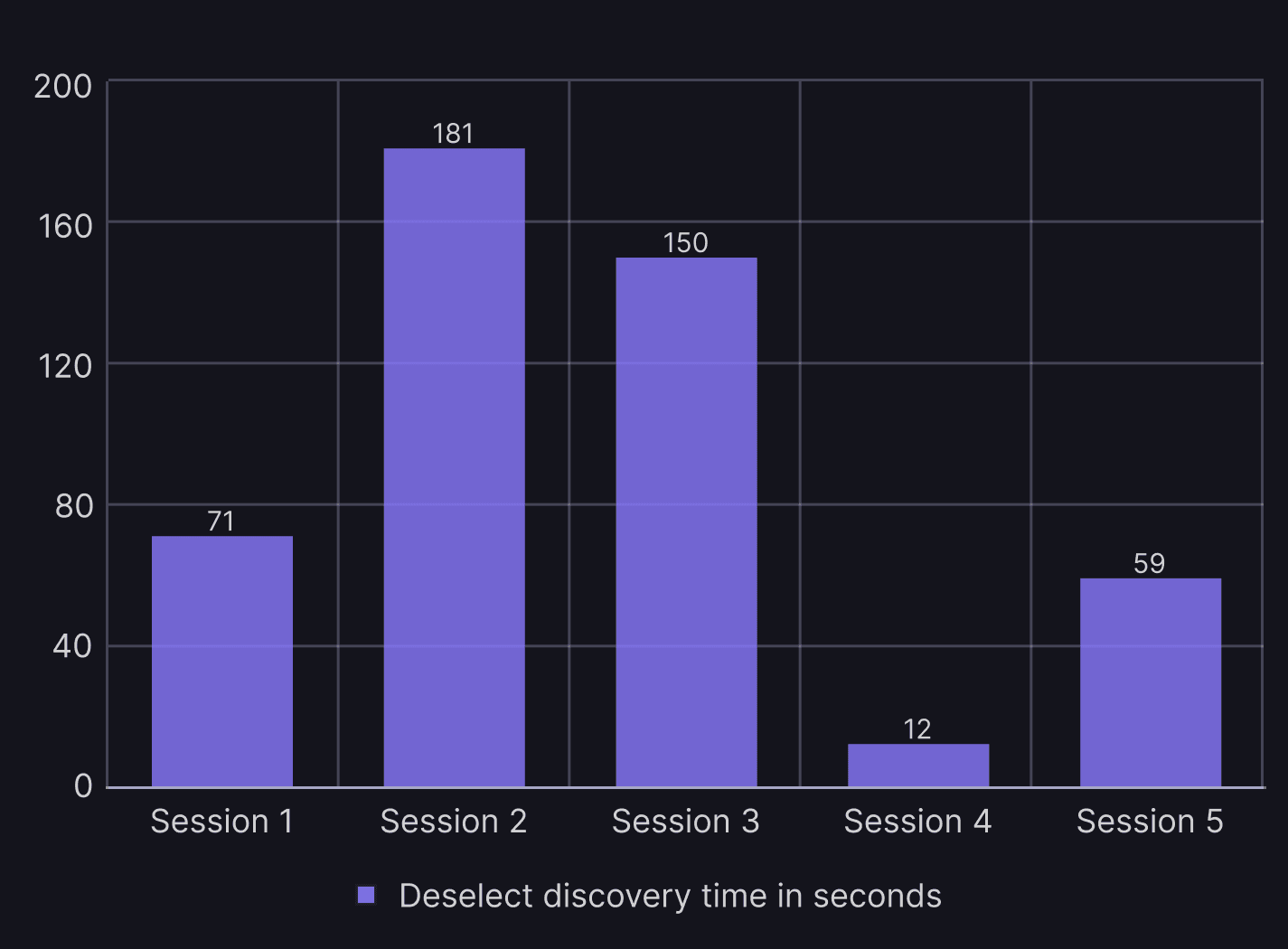
How long does it take to discover that the same action will select and deselect a line on the map?
Selecting a line that has already been selected will deselect it. In this way, a user can quickly select a group of adjacent lines and then exclude one or more lines by repeating the selection action on those.
time on task
With 1/5 participants completing the task in under 30 seconds, there is no support for the expectation that the discoverability of the pan tool is acceptable. All but one of the participants needed a minute or more to discover the method.
errors
Task error rate: 80% (Four participants committed at least one error before completing the task)
- Two participants tried avoiding the need to deselect by combining marquee selections. This is a valid approach, but it’s the more laborious alternative in this task.
- Two participants tried command-click
- One participant tried control-click
- One participant tried right-click
- One participant slipped twice: released the shift key before clicking
- One participant tried to use the command panel
Impact
The product team decided to launch the product as it was. They did not want to run subsequent usability tests. I myself saw errors in panning with customers on occasion afterwards. In my view, this error was not nearly as significant as using the wrong facet in the filter box.